Notifications / Notice, confirm, collect
Make Delivery Alerts Useful
An alert should prompt a sensible next step. Start by understanding what triggered it, then decide how your household will confirm and collect the delivery.
Know what the signal actually means
A carrier’s delivered status, a lid-opening sensor and a camera’s motion alert describe different events. A delivery scan is a record in the carrier’s system. A contact sensor generally reports that two parts moved apart or together. A motion alert indicates activity within a detection area. None alone establishes that your particular parcel is undamaged and inside the intended receiving space.
Choose an event that helps your routine. If the main problem is forgetting to empty the box, a reliable reminder may be more useful than a camera. If the problem is an entrance that couriers cannot locate, better address visibility and delivery instructions should come first. Connected features should respond to a defined need rather than create another feed to monitor.
Label notifications clearly where the system allows it. “Parcel lid opened” is more accurate than “Parcel safely delivered”. Avoid household automations that unlock a door or disable another protection merely because a motion or lid event occurs. A sensor is an input with limitations, not proof of a trusted person’s identity.
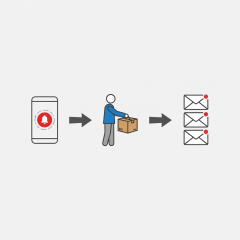
Build the smallest useful flow
Keep the sequence understandable to everyone who may collect a delivery. Add automation only when it reduces a real task without hiding important uncertainty.
Event recorded
A carrier update or sensor event is created. Its meaning depends on the source.
Household prompted
A permitted device receives an alert, subject to power, connectivity and phone settings.
Delivery checked
A household member confirms the receiving space and brings the parcel indoors.
Test connectivity at the box
Do not judge outdoor coverage by the signal beside your router. Test the intended position with doors closed and the sensor in its normal installed location. Metal enclosures can weaken radio signals. Weather, battery condition, network changes and the distance to a hub can all affect reliability, so repeat the test after the installation is complete.
Wi-Fi, Bluetooth, Zigbee and Thread have different network requirements. A device may need a compatible hub, bridge or border router, and remote alerts may depend on an internet connection or cloud account. Matter support does not mean that every feature appears in every controller. Verify the exact model, supported functions and local-versus-cloud behaviour before buying.
When using Apple Home, Google Home or Home Assistant, confirm what the integration actually exposes. A sensor’s basic open state may work while battery reporting, history or remote access behaves differently. Ask about subscription requirements, software support and the outcome if a vendor ends a service. A supported offline collection method should remain available.

Keep the account and the household in view
Use a unique account password and multi-factor authentication where supported. Install updates, remove access for former household members and avoid sharing one permanent password with everyone. The UK National Cyber Security Centre provides general guidance on protecting connected devices and accounts; the Federal Trade Commission also publishes consumer guidance on smart-home privacy.
If a camera is involved, consider neighbouring doors, shared areas and public paths before choosing its view. Check local data-protection, signage and recording requirements rather than assuming that domestic use removes every obligation. The UK Information Commissioner’s Office publishes relevant domestic CCTV guidance for UK users. A less intrusive sensor may meet your need without recording people.
Adjust alerts so they remain noticeable. Repeated low-value messages encourage people to mute the whole system. Decide who should receive a delivery prompt, whether quiet hours apply and what to do if nobody can collect promptly. Test phone notification permissions and battery-saving settings, which can delay or suppress an otherwise successful device event.
Make failure ordinary and manageable
Keep a routine that works during a flat battery, internet outage or lost phone. Mechanical retrieval, a securely stored spare key and a household check on arriving home can be more important than a sophisticated dashboard. Periodically test the fallback instead of waiting until a parcel is inaccessible.
For unexpected delivery messages, open the carrier’s known website or app independently rather than following a payment link in a text. Phishing messages can imitate familiar brands. A claimed missed-delivery fee or urgent request for account details is a reason to verify the shipment through a trusted channel, not a reason to act faster.